

Important: Before starting, you must complete the QUICKSTART: Audio Setup Guide first.
Overview
SpatGRIS is used to spatialize sounds in MBAP and VBAP. Compared to using ambisonics MBAP/VBAP generally activate less speakers to localize a sound, resulting in the perception of hearing sounds more precisely located in the space.
You send your sounds to SpatGRIS via BlackHole and also send each sound’s XYZ or azimuth position via OSC to SpatGRIS to spatialize them.
For this tutorial, we are using an example Max Patch sending audio and position data to SpatGRIS.
Launching Programs
- On the Omicron Mac desktop, double-click on VBAP_Launch.command to launch SpatGRIS. This program is used for VBAP spatialization in the IAS.
- In SpatGRIS, go to File > Settings and make sure the AUDIO INPUT is set to “BlackHole 256ch” and AUDIO OUTPUT is set to “Dante Virtual Soundcard”
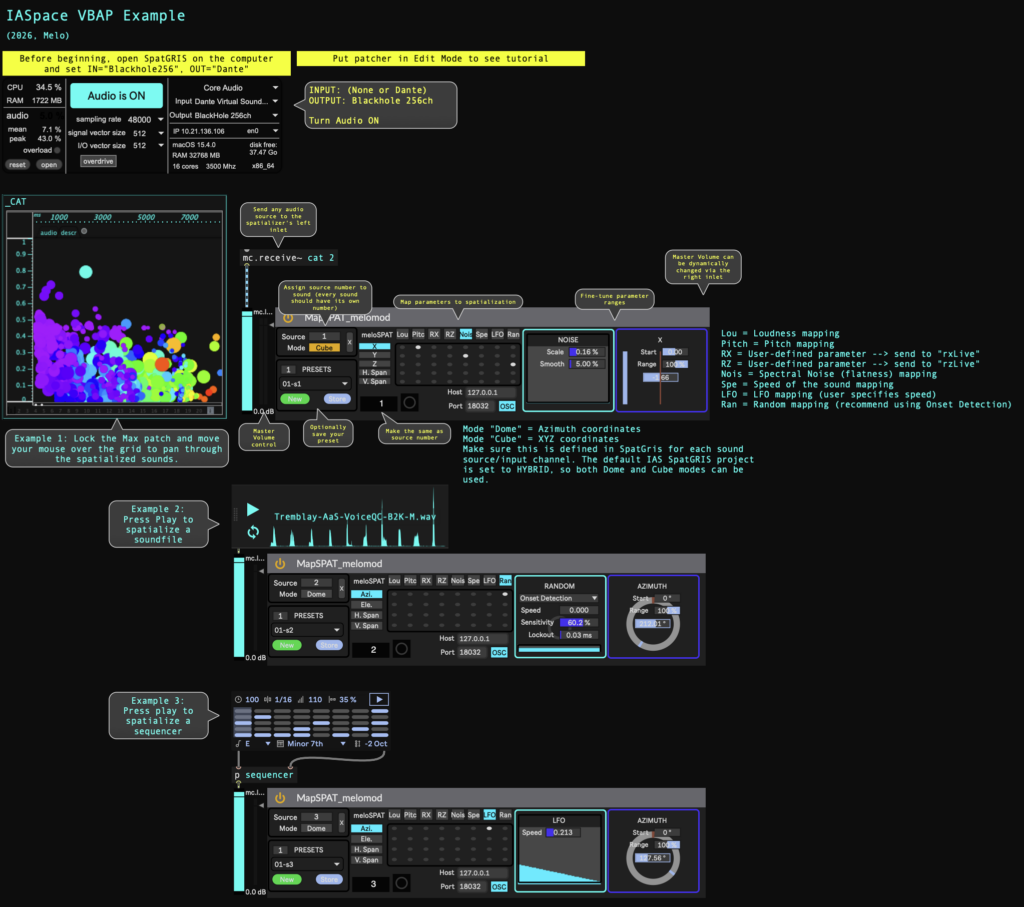
- A second window that opens is an example Max patch to use with SpatGRIS.
- In Max, go to Options > Audio Settings and make sure that OUTPUT DEVICE is set to “BlackHole 256ch”
Max Patch Tutorial
- Put the patcher in Edit Mode to see the full tutorial.
- Turn on the sound by clicking “Audio is OFF” –> this should change to “Audio is ON”
- Example 1: Move your mouse over the graph of sound dots to pan between spatialized sound snippets, which pitch and noisiness determine the sound’s spatial coordinates.
- Example 2: Press play on the sound file to hear the sounds spatialized randomly.
- Example 3: Press play on the sequencer to hear the sequencer spatialized gradually in a circle formation.
- You can make a copy of this patch (File > Save As…) and use it as a start for your own sound projects.
 Anonymous