

This document outlines the mandatory protocols for using the shared audio infrastructure at the Immersive Arts Space. This applies to both students and personnel of the Immersive Arts Space. For any questions, contact Melody Chua.
1. Yamaha Mixer Scene Presets
Do not modify the “IAS ambisonic” or “IAS+AFC” scene presets under any circumstances.
These two presets are the shared baseline configurations for the IAS audio system. To work with your own mixer settings:
- Create a copy of the relevant preset (IAS Ambisonic or IAS+AFC).
- Rename the copy to your project name.
- Make all changes within your own copy only.
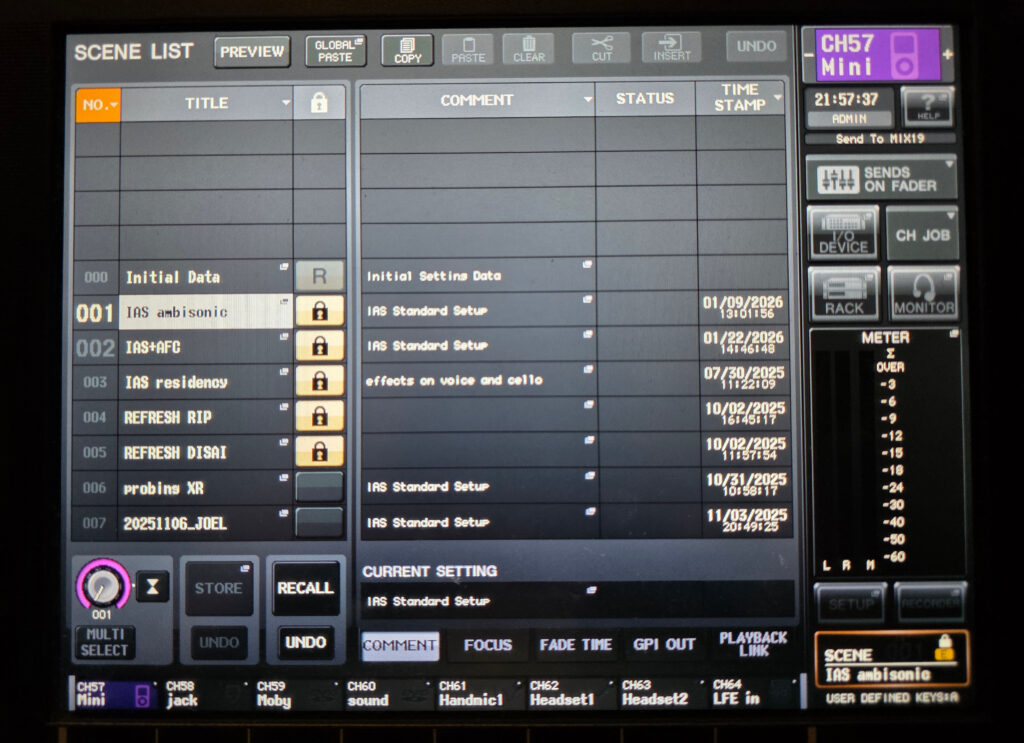
If you believe a change to either base preset is necessary, contact Melody Chua before making any edits. Changes to the “IAS ambisonic” or “IAS+AFC” presets require her explicit approval.
2. IAS Audio Computer (OP-8) — File Management
Do not store personal files, project files, or minor-related files on the desktop.
The OP-8 desktop must remain clean and contain only the following items:
- IAS Sharepoint shortcut
- IAS Technical Rider pdf
- IAS_AUDIO_SETUP.command auto-launch script
Where to store your files instead:
- Project files →
DATAdrive →Projectsfolder - Audio preset files → IAS OneDrive →
00_base_setupfolder (accessible via the shortcut on the left-hand side of Finder)
Any files found on the desktop are subject to deletion during routine clean-up.
 Anonymous